Convert AI to Human Text — Free AI Humanizer
The #1 AI humanizer trusted by 200,000+ students & professionals
Add one URL as a connector and your assistant can rewrite drafts and score them for AI-written content mid-conversation. No SDK, no glue code, no second tab. Every call runs on your Rephrasy account and the credits you already have. It humanizes images too.
Connector URL
https://v2-humanizer.rephrasy.ai/mcpAuthenticate with the same Rephrasy API key you use for the REST API.
Five things people actually use it for, with the responses the tools really return.
You say
“Humanize this blog intro for me, it reads like a press release.”
humanize_textYou get back
{
  "output": "Remote work didn't arrive gently. It landed in March 2020…",
  "engine": "v4",
  "report": {
    "words_in": 118,
    "words_out": 121,
    "length_ratio": 1.025,
    "figures_kept": ["2020", "42"],
    "figures_missing": [],
    "figures_added": [],
    "flesch_reading_ease": 68.4
  }
}
Every rewrite comes back with a preservation report: how the length moved, which figures survived, and which the rewrite lost or invented. You see what changed instead of trusting that nothing did.
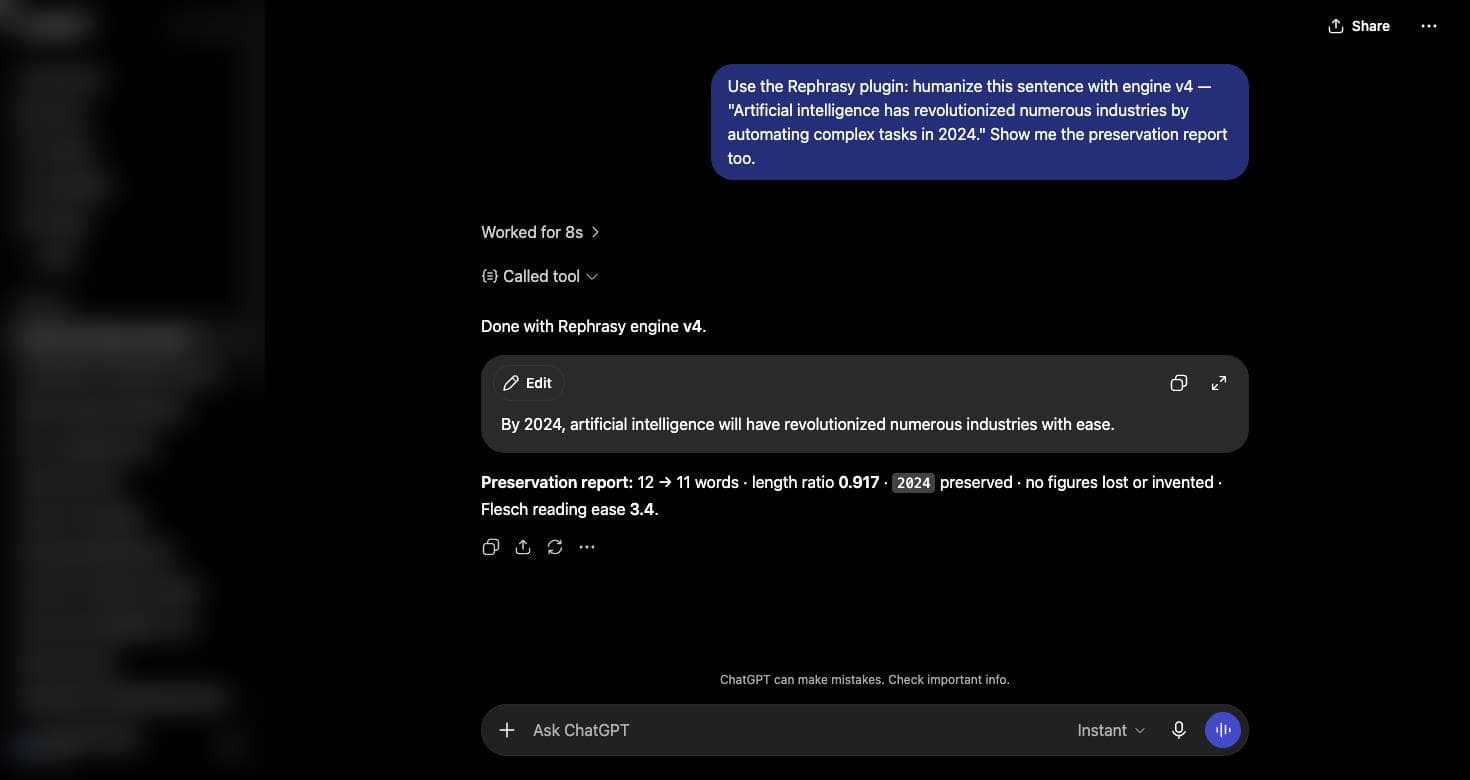
And here it is running
A real conversation, not a mock-up: ChatGPT calls the connector over OAuth, rewrites the sentence with v4 and reports what survived — the figure 2024 kept, nothing lost or invented.
One URL and your API key. Under a minute in any client.
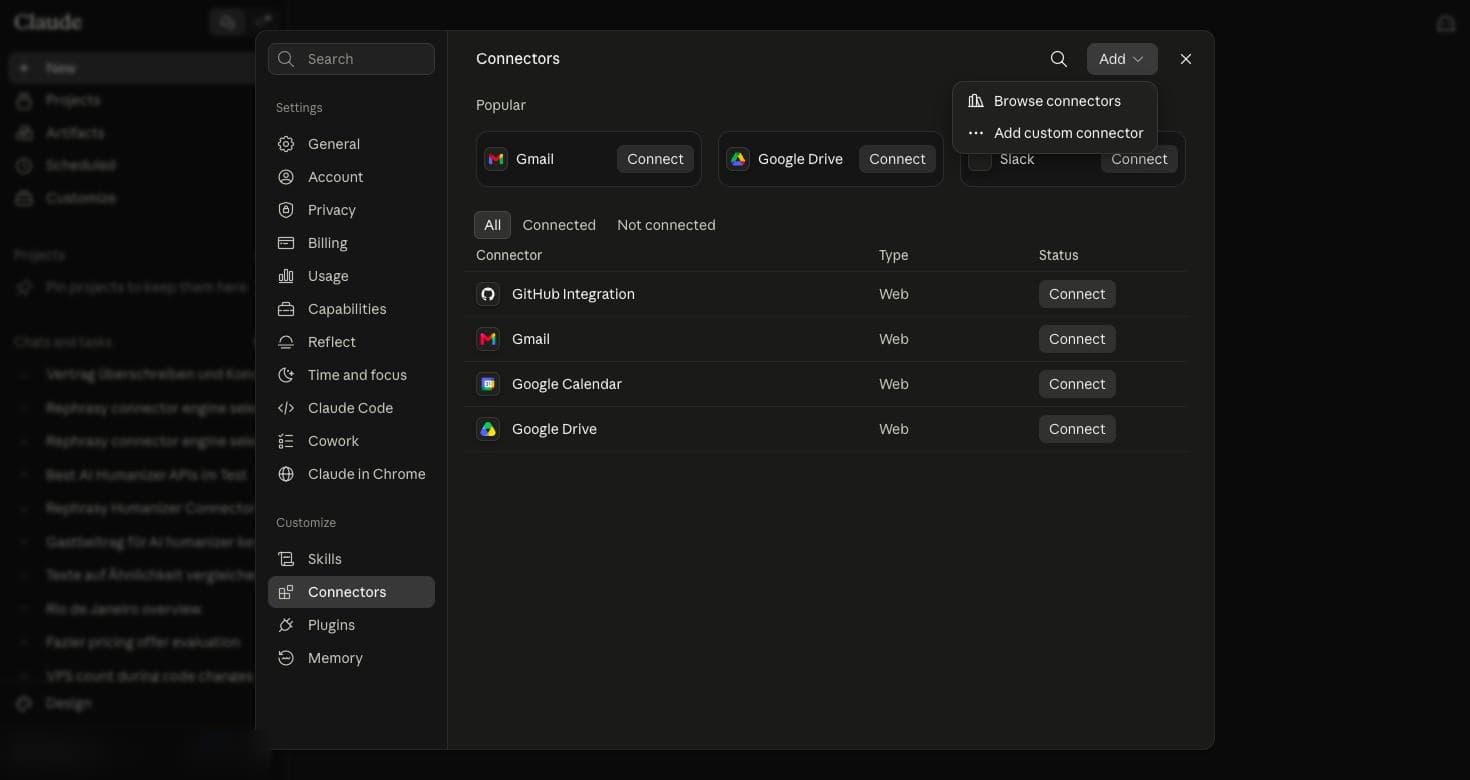
Click a step to see that screen.
Your API key
Authorization: Bearer YOUR_API_KEYThe same key as the REST API — find it in your Rephrasy account. Claude and ChatGPT ask for it once on our consent page and get a token back, so the key stays with us. Claude Code and Cursor send it directly as the header above. Either way it is never part of a prompt.
Eight tools. All need your Rephrasy account; three spend credits, five do not.
| Tool | Cost | What it does |
|---|---|---|
| humanize_text | 1 credit | Rewrites a draft into natural prose. Takes a purpose (blog, marketing, seo, report, technical) and picks the engine for you, or name the engine yourself. Returns the rewrite plus a preservation report. |
| check_ai_score | 1 credit | Scores text for AI-written content and returns the passages that scored highest, so you can see which parts to revise. |
| recommend_engine | No credit | Suggests the engine and voice for a kind of writing. |
| readability_score | No credit | Flesch reading-ease score for any text. |
| list_engines | No credit | Lists the engines, voices and detectors your connector can use. |
| credits_left | No credit | Tells you how many credits the connected account has left, and how many calls that buys. Every paid answer carries the same number, so the assistant can warn you before a long job runs dry. |
| humanize_image | 10 credits (hq: 20) | Humanizes an image: a diffusion pass removes invisible AI watermarks such as SynthID, while subject and resolution stay the same. Takes a public image URL or the image itself (PNG, JPEG, WEBP, up to 4 MB). Returns a download link valid for 72 hours; a failed image is refunded. |
| get_image_result | No credit | Checks on an image that is still processing and returns its download link once it is done. HQ images take about four minutes. |
The same model names the REST API takes. Leave the choice to the purpose you give, or name one directly.
v4v4 — the recommended default. Natural rhythm and sentence variety, length stays close to the source.
ft_clean-v3ft_clean-v3 — the highest meaning retention (0.96 mean cosine on our benchmark against 0.92 for v4) and near-identical length. For technical writing and anything with figures.
v3v3 — a voice-driven rewrite. Pick a style; 'creative' is the strongest and also the longest, so avoid it when length matters.
seoseo — rewrites around the keywords you need to keep.
The Rephrasy AI Detector works the moment you connect — no extra account, one flat credit per check. Other detectors run on your own key, and that provider bills you directly with no Rephrasy credit charged. In Claude, add a request header named x-key to the connector (Claude only allows a fixed list of header names, and x-key is on it) with the value shown below. Claude Code and Cursor also accept the dedicated headers such as x-gptzero-key. ChatGPT has no header field yet, so it runs on the Rephrasy detector.
| Detector | Header value |
|---|---|
| Rephrasy AI Detector | Included — nothing to set up |
| wasitaigenerated.com | x-key: wia:YOUR_KEY |
| GPTZero | x-key: gptzero:YOUR_KEY |
| Winston AI | x-key: winston:YOUR_KEY |
| Copyleaks | x-key: copyleaks:YOUR_KEY:YOUR_EMAIL |
| Pangram | x-key: pangram:YOUR_KEY |
| ZeroGPT | x-key: zerogpt:YOUR_KEY |
Several detectors fit in one header, comma-separated: gptzero:KEY1, zerogpt:KEY2. Ask list_engines to see which detectors your connector can currently use. Pangram needs at least 100 words; Copyleaks at least 255 characters.
Convert AI to Human Text — Free AI Humanizer
The #1 AI humanizer trusted by 200,000+ students & professionals